Best Digital Marketing Lead Generation Tools for 2026
Best Digital Marketing Lead Generation Tools for 2026
 General
Search for digital marketing lead generation tools and you will find endless ranked lists, most written by the vendors themselves. A small business does not need a list. It needs to know which kinds of tool do which job, and how many it can realistically manage. This guide sorts the options into categories, names a few widely known examples without ranking them, and sets out how to choose. It also covers the hidden cost of running too many systems. If you are still deciding what you want those tools to support, start with strategies that suit a tight budget.
Key Takeaways
- Think in categories first: a CRM, a way to capture enquiries, a way to follow up and a way to measure what worked.
- Judge every tool on data ownership, GDPR fit, integration and whether your team will actually use it.
- Each extra system adds logins, subscriptions and gaps where leads go missing, so fewer connected tools usually beat a large stack.
What kinds of digital marketing lead generation tools does a small business need?
Most lead tools fall into eight categories. You rarely need all of them on day one, but knowing the full map stops you buying two tools that do the same job. It also shows you which gaps matter most for the way your customers actually get in touch.
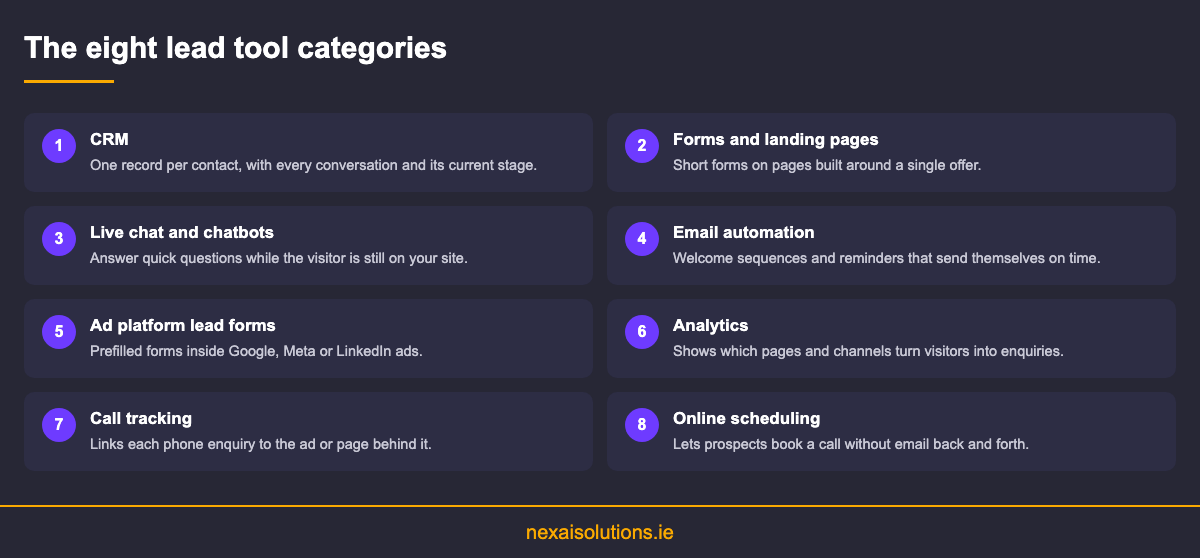
The CRM sits at the centre. It holds every contact, every conversation and the stage each enquiry has reached. HubSpot is a widely known example, and many all in one marketing platforms include a lighter CRM of their own. Without one, leads live in inboxes, notebooks and spreadsheets, and that is where they get lost.
Capture tools come next: website forms and landing pages, live chat and chatbots, and online scheduling that lets someone book a call without the back and forth of email. Follow up tools include email automation such as Mailchimp, which sends a welcome sequence or a reminder without anyone remembering to do it.
Finally, measurement tools tell you which channel produced which customer. Web analytics shows behaviour on your site, while call tracking connects phone enquiries to the ad or page that prompted them. For many Irish trades and clinics the phone is still the main enquiry route, so leaving calls untracked hides half the picture.
Should you capture leads inside ad platforms or on your own website?
The big ad platforms now let people enquire without leaving the ad. Google Ads offers lead form assets, Meta has lead ads on Facebook and Instagram, and LinkedIn has Lead Gen Forms for B2B audiences. Each form arrives prefilled with details the platform already holds, which removes friction on a mobile screen.
That convenience cuts both ways. Because filling the form takes seconds, some people submit without much intent, and quality can be uneven. A website form asks a little more effort, but the person has usually read your page first and knows what they are asking for.
For B2B services, LinkedIn documents how its Lead Gen Forms work, including the fields you can collect. Whichever platform you use, the practical issue is the same: those leads sit inside the ad account until something moves them. If nobody exports them or connects them to your CRM, they wait there unanswered.
A sensible rule is to test both and compare what happens after the form, not just how many forms arrive. Track which source turns into booked calls and paying customers, and give the test long enough to include the slower deals that close weeks later. Our explainer on how capture, qualification and hand off fit together shows where each tool sits in that journey.
How do you choose the right tools for your team?
Start with the job, not the feature list. Write down how an enquiry should travel from first contact to booked work, then look for the fewest tools that cover that path. Anything that does not serve a step on it can wait.
Data comes next. Check where the tool stores personal data, whether it supports consent records and whether you can export everything if you leave. You own your customer list, and a tool that makes it hard to take that list elsewhere is a risk, not a convenience.
Integration matters more than any single feature. A form that cannot pass its data to your CRM creates manual copying, and manual copying creates delays and mistakes. Ask whether tools connect natively or depend on a third party connector that someone has to maintain.
Finally, be honest about adoption. A powerful system nobody opens is worth less than a simple one the whole team uses every day. Pricing models vary, from per user to per contact to tiered bundles, so model the cost as your list and team grow. Tools also depend on demand: building interest before you capture it keeps them fed.
How should you set up new lead tools so they actually get used?
Most tools fail in the first month, not because they are wrong but because nobody finishes setting them up. A short, deliberate rollout avoids that. Treat it as a small project with an owner and an end date rather than something to fit in between jobs.
Begin by connecting every capture point to the CRM: website forms, ad lead forms, chat and booking links. Send a test enquiry through each one and confirm it lands with the right details and the right person notified. This single step catches most of the leaks that later look like a channel not working.
Next, agree a few simple rules as a team. Decide who replies to which kind of enquiry, how quickly, and what counts as a qualified lead. Write the stages of your pipeline in plain language so everyone records progress the same way. Tools only reflect the habits of the people using them.
Then switch on automation gradually. A welcome email and a reminder for unanswered enquiries are enough to start. Review the reports together after a few weeks, remove anything nobody uses and only then consider adding more. Growing a stack slowly is far cheaper than untangling one later.
What does tool sprawl cost, and is one unified platform better?
Tool sprawl creeps in quietly. A chat widget here, a scheduling app there, a separate email tool and an ads dashboard nobody checks. Each subscription looks small, but together they add cost, logins and gaps between systems where a lead can sit unseen for days.
Reporting suffers too. When every tool counts leads differently, nobody can say which channel actually produced customers. Security is another cost: each extra system holding contact data is another account to secure. The National Cyber Security Centre publishes guidance that is worth reading if your stack has grown without a plan.
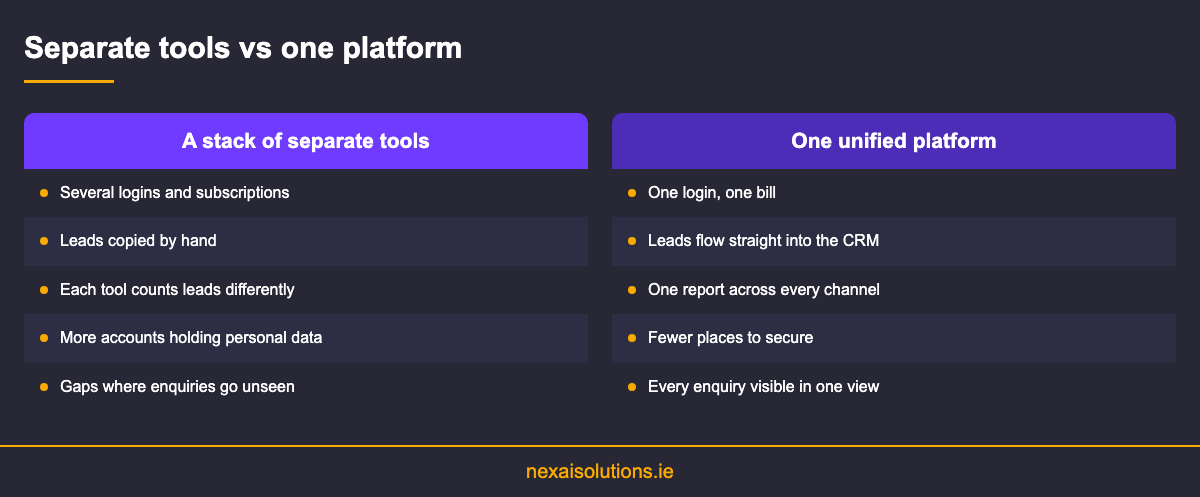
That is the case for a unified platform. The NexAI platform brings a mini CRM for lead tracking, a single dashboard across channels, AI content generation with social scheduling and performance reporting into one place. One login means one source of truth, and follow up is less likely to slip.
A unified platform will not suit every business, and specialist tools still have a place. The test is simple: if your team spends more time moving data between tools than talking to leads, consolidation will pay off. If you would rather have a provider set up and run the tools for you, what a nationwide retainer covers explains what to expect.
Conclusion
The best digital marketing lead generation tools are the ones your team uses every day, connected so no enquiry falls between systems. Start with a CRM, add only the capture, follow up and measurement tools your process needs, and check data ownership before you sign up to anything.
If you would like a second opinion on your current setup, talk to the NexAI Solutions team and book a free consultation.
Frequently Asked Questions
What are digital marketing lead generation tools?
They are the software a business uses to attract, capture, follow up and measure enquiries online. The main categories are CRM, forms and landing pages, chat, email automation, ad lead forms, analytics, call tracking and scheduling.
Which lead tool should a small business buy first?
A CRM, even a simple one. Every other tool feeds it, and without a single record of each enquiry, leads end up scattered across inboxes and spreadsheets. Add capture and follow up tools once that foundation is in place.
Are ad platform lead forms better than website forms?
Neither is better in every case. Ad lead forms reduce friction, especially on mobile, but can bring lower intent. Website forms ask more effort from people who have read your page. Test both and compare booked calls, not form counts.
Do I need a separate chatbot?
Only if visitors regularly ask questions your pages do not answer. A chatbot that handles opening hours, service areas and booking links can help, but it should pass anything complex to a person and record the conversation in your CRM.
How do lead tools affect GDPR compliance?
Every tool that stores contact details is processing personal data, so check where it is stored, whether consent can be recorded and whether you can export or delete records on request. Fewer tools make that easier to manage.
What is tool sprawl?
Tool sprawl is what happens when a business keeps adding software for each new task until nobody knows which system holds the truth. It increases cost, creates manual data copying and leaves gaps where enquiries go unanswered for days.
Can one platform replace all my lead tools?
For many small businesses it can cover the core: CRM, content, scheduling, reporting and a unified dashboard. Specialist needs may still call for a dedicated tool. Our explainer on how each channel plays its part helps map what you need.
Should I manage the tools myself or hire someone?
If you have time and a clear process, managing them yourself is realistic. If tools sit unused, an outside partner can set them up and run them. Use our agency buyer checklist to compare providers fairly.
Frequently Asked Questions
What are digital marketing lead generation tools?

Which lead tool should a small business buy first?
Are ad platform lead forms better than website forms?
Do I need a separate chatbot?
How do lead tools affect GDPR compliance?
What is tool sprawl?
Can one platform replace all my lead tools?
Should I manage the tools myself or hire someone?